Build smarter apps with AI
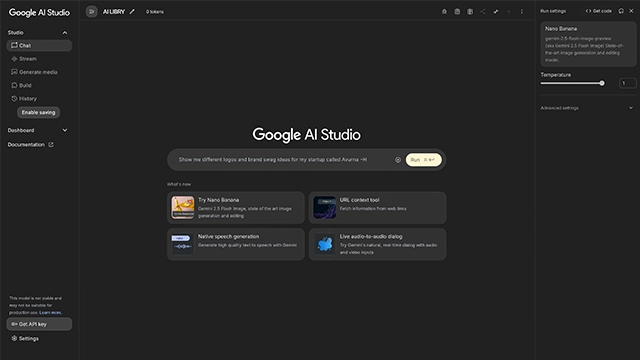
Think about how hard it used to be to build an AI-powered app. You needed coding knowledge, complex frameworks, and lots of time. Google AI Studio changes that.
It’s a platform built by Google to help developers, startups, and even curious beginners create and test AI applications faster. The idea is simple: take the power of Google’s AI models like Gemini and make them easy to use through a friendly, browser-based studio.
You can design prompts, test responses, refine workflows, and even export your projects into production-ready environments. In other words, it’s a creative playground for anyone who wants to build with AI but doesn’t want to get stuck in technical roadblocks.
Whether you’re prototyping a chatbot, designing a research tool, or experimenting with new AI-driven features, Google AI Studio is designed to lower the barrier and speed up the process.
Google AI Studio is built to make working with advanced AI models approachable while still powerful enough for developers. Here’s what stands out:
1. Access to Google’s Gemini models
You get direct access to Google’s latest AI models, which means stronger reasoning, natural language understanding, and multimodal capabilities.
2. Prompt design and testing
Instead of writing code first, you can design prompts directly in the interface, test outputs, and refine them on the spot.
3. Code export
Once you’re happy with your prototype, you can export working code to integrate into your app or service saving hours of manual setup.
4. Multimodal support
It’s not just about text. AI Studio allows you to experiment with different input types like images or structured data (depending on the model).
5. Collaboration-friendly
You can share prompts and projects with teammates, making it easier to co-create AI solutions.
6. Free tier for exploration
Google offers a free usage tier so anyone can start experimenting without upfront cost.
7. Simple, browser-based interface
No complicated installs. You open AI Studio in your browser, start building, and test as you go.
In short, Google AI Studio combines ease-of-use for beginners with serious functionality for developers a rare mix in the AI tool space.
The real strength of Google AI Studio is how versatile it can be. It isn’t just for one industry or workflow it adapts to what you’re trying to build. Here are some ways people are using it:
1. Chatbots and Virtual Assistants
Businesses can prototype customer support bots or internal helpdesk assistants without heavy development overhead.
2. Content Generation
Writers and marketers can test prompts for blog drafts, ad copy, or social media ideas, then refine outputs before scaling.
3. Education and Research
Teachers, students, and researchers use it to summarize papers, design study tools, or create interactive learning assistants.
4. Prototyping AI Apps
Startups and developers can quickly sketch out an AI-powered app idea, test it in the studio, and export production-ready code.
5. Data Analysis Helpers
Professionals can design AI assistants that parse structured data, answer queries, or generate insights from documents.
6. Multimodal Experiments
Because Google’s Gemini models support different input types, users can explore text + image use cases like building smarter search or analysis tools.
Put simply, Google AI Studio acts like a launchpad for ideas. Whether you’re a student trying AI for the first time or a developer building for scale, it gives you a faster path from “what if” to working prototype.
Google AI Studio offers a flexible model so you can start small and scale as your needs grow.
Free Tier
Great for beginners and experimentation
Includes a limited number of requests each month
Lets you test Gemini models, design prompts, and explore the interface without cost
Pay-as-you-go
Pricing is based on API usage when you move projects into production
Costs vary depending on the Gemini model you’re using (for example, Gemini 1.5 Pro vs Gemini 1.5 Flash) and the volume of requests
You only pay for what you use, making it budget-friendly for startups or small teams
Enterprise Options
Larger businesses can negotiate custom plans
Includes higher limits, enterprise-grade support, and integration flexibility
Important Note: Pricing details change often as Google updates its models. For the most accurate numbers, it’s best to check the official Google AI Studio pricing page.
In practice, the free tier is enough to get comfortable with the tool, while scaling up is as simple as moving from Studio into Vertex AI or Google Cloud billing.
Like any AI tool, Google AI Studio has its strengths and trade-offs. Here’s the breakdown:
Google AI Studio is perfect for experimentation and small-to-medium projects, but large-scale use will need careful planning around costs and infrastructure.
Google AI Studio strikes a balance between accessibility and power. It’s not just another AI playground it’s a gateway into Google’s Gemini models with a simple, browser-based setup. If you’re exploring generative AI for the first time, the free tier is generous enough to experiment. For developers, its tight link to Vertex AI means you can scale from idea to production without switching platforms.
Of course, it’s not flawless. Heavy users may find costs rise quickly, and some advanced features are still catching up compared to other AI development tools. But for most teams and individuals who want a reliable, beginner-friendly, and future-proof platform, it’s an excellent pick.
If you’re curious about AI or want to build prototypes with ease, this tool is worth your time. For enterprise-scale needs, pair it with Google Cloud’s broader ecosystem.
Is it safe to use Google AI Studio?
Yes. Google AI Studio is built with Google’s security and privacy standards. Your data is handled within the Google Cloud ecosystem, making it as safe as other Google services you already trust.
Is Google AI Studio better than others?
It depends on what you need. Google AI Studio stands out for its direct access to Gemini models and smooth integration with Google Cloud. However, if you want advanced customization or prefer non-Google ecosystems, other tools may be a better fit.
Are Google AI Studio chats private?
Yes. Your conversations are private and tied to your Google account. Just like with other AI platforms, it’s best not to enter sensitive personal or confidential information.
Is Google AI Studio free or paid?
Both. There’s a free tier with limited usage that’s great for testing. If you need more credits, larger models, or team features, you’ll need a paid plan.
Does Google AI Studio save chats?
Yes, but only within your session and account. You can revisit your past prompts and experiments, which is useful for refining work over time.
AI-powered answers, backed by real-time sources you can trust.
Your smart AI companion that writes, thinks, and chats—just like a human (but faster).
The chatbot that dares to have a personality.

Your one-stop curated AI directory. Explore, compare, and leverage top verified AI tools across dozens of real-world workflows.
© 2026 AI Libry. All rights reserved. Curating the intelligence frontier.