Create logos quickly and easily
Verified
AI Categories: Logo Generator,
Pricing Model: Free
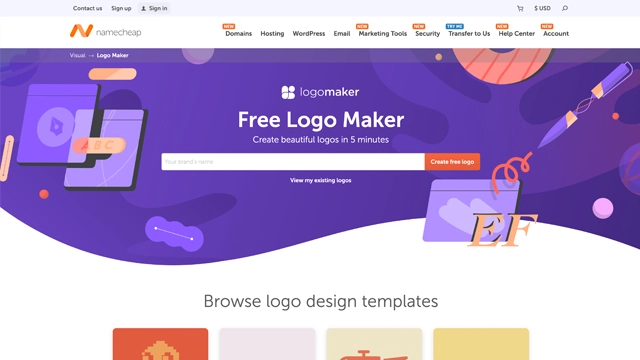
Designing a logo can feel intimidating if you’re not a designer. Choosing colors, fonts, icons, and layouts can overwhelm anyone.
Namecheap Logo Maker removes that stress. It’s an AI-powered tool that generates professional logo designs in minutes. You provide your brand name, a tagline if needed, and some style preferences. The AI then produces multiple logo options that match your inputs.
The best part? You don’t need to download complicated software or hire a designer. The entire process is browser-based, simple, and fast.
Think of it as a friendly assistant that takes your brand idea and turns it into a visual identity without overthinking. It’s ideal for small businesses, startups, freelancers, or anyone needing a clean, ready-to-use logo.
Namecheap Logo Maker keeps the focus on speed, simplicity, and customization. Here’s what it offers:
AI-Powered Logo Generation
Enter your brand name, tagline, and style preferences. The AI produces multiple logo variations tailored to your inputs. It’s like having a design assistant who never sleeps.
Customization Tools
Once the logos are generated, you can tweak colors, fonts, icons, and layout. This ensures the final logo aligns with your brand vision without needing design experience.
High-Resolution Downloads
Download your logo in multiple formats, including PNG and SVG. You can use it for websites, social media, business cards, and more without worrying about resolution or quality.
Browser-Based Platform
No installations required. The entire process runs in your browser, making it accessible anywhere you have an internet connection.
Fast and Intuitive Workflow
From entering your brand name to finalizing a logo, the process can take just a few minutes. The interface is clean, beginner-friendly, and designed to minimize friction.
Brand Inspiration Assistance
The AI suggests styles, color palettes, and iconography based on your brand description, helping you refine your visual identity effortlessly.
Namecheap Logo Maker works best for anyone needing a professional-looking logo without hiring a designer. Here are the most common use cases:
Small Businesses and Startups
New businesses often need a quick, cost-effective logo to establish a visual identity. Namecheap Logo Maker provides multiple options in minutes, ready for websites, social media, and print.
Freelancers and Personal Brands
Freelancers, content creators, and consultants can create a logo for their personal brand without breaking the bank or learning design software.
Event and Project Branding
Temporary projects, workshops, online courses, or events need branding fast. This tool generates logos quickly, making it ideal for short-term or one-off needs.
Social Media Presence
Influencers or online entrepreneurs can design consistent branding across platforms, ensuring their profile visuals look professional.
E-commerce and Online Stores
Small online shops or marketplaces can use it to create logos that appear trustworthy and professional, helping improve customer confidence.
Educational or Non-Profit Projects
Students, clubs, and non-profits can generate logos for presentations, campaigns, or websites quickly and without cost.
Namecheap Logo Maker follows a simple and accessible pricing model.
Free to Use
The tool is completely free. You can generate and customize logos, download them in high-resolution formats, and use them for commercial or personal purposes. There are no hidden charges or subscription requirements.
Optional Paid Services
While the logo creation itself is free, Namecheap also offers optional paid services like domain registration, website hosting, or business branding packages. These are separate and not required to use the logo maker.
Is it worth paying?
For most users, the free logo maker is sufficient. Paid services only become relevant if you want to integrate your new logo into a full website or professional branding package.
The main takeaway: high-quality logo design at zero cost.
Namecheap Logo Maker is straightforward, but like any tool, it has strengths and limitations.
Pros
Completely free
You can generate and download logos without paying a dime.
Easy to use
The AI-guided workflow is beginner-friendly and requires no design experience.
Fast results
Create multiple logo variations within minutes, ideal for quick projects.
Customizable designs
Edit colors, fonts, icons, and layout to align with your brand vision.
High-resolution downloads
Logos are ready for websites, social media, print, and more.
Cons
Limited advanced design control
Professional designers may find customization options basic compared to dedicated design software.
Generic results for common brand names
Some logos may look similar to others, especially for widely used terms or industries.
No animation or advanced branding assets
The tool focuses on static logos; animated or full branding kits are not included.
Dependent on AI suggestions
While AI helps, creative direction still depends on the user’s input.
Namecheap Logo Maker is a fast, free, and beginner-friendly tool for anyone needing a professional logo without hiring a designer.
It works best for:
It’s not meant for advanced designers or for creating complex branding packages. But for most users, it delivers high-quality, customizable logos in minutes.
If you need a reliable, free solution to create a professional logo quickly, Namecheap Logo Maker is an excellent choice.
Is Namecheap Logo Maker free?
Yes. The tool is completely free to use. You can generate, customize, and download high-resolution logos for personal or commercial use without paying.
Do I need design skills to use it?
No. The AI-guided workflow is beginner-friendly. You can create professional logos without prior design experience.
Can I use the logos commercially?
Yes. Logos generated with Namecheap Logo Maker can be used for business, marketing, websites, and social media.
Can I customize the logos?
Yes. You can edit colors, fonts, icons, and layouts to match your brand’s style.
Are there any hidden costs?
No. Logo creation is free. Optional Namecheap services like domains or hosting are separate and not required to use the logo maker.
Can I create multiple logos for different projects?
Yes. You can generate as many logos as you like, each tailored to different brand names or styles.
How does it compare to paid logo design tools?
It offers a simple, fast, and free solution for most needs. Advanced tools may offer more design flexibility, animations, or full branding kits, but Namecheap Logo Maker is ideal for quick and professional static logos.
Featured AI Tools
Figma AI
Freemium, $15/mo
Design smarter, not harder—with Figma AI and Vibe as your creative copilots.
No matching products found.

Your one-stop curated AI directory. Explore, compare, and leverage top verified AI tools across dozens of real-world workflows.
© 2026 AI Libry. All rights reserved. Curating the intelligence frontier.
 Visit Site