Studio sound without studio
Adobe Podcast AI is built for one very specific problem.
Bad audio.
You know the kind. Echoey rooms. Laptop microphones. Background noise. Recordings that sound fine to you but feel rough to listeners.
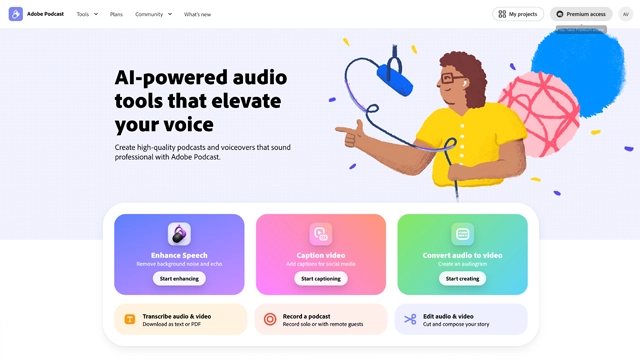
Adobe Podcast AI steps in and cleans that up using AI. You upload your voice recording and the tool enhances it to sound like it was recorded in a professional studio.
The simplest way to think about it
It doesn’t edit your content.
It fixes how your content sounds.
It’s part of Adobe’s growing AI powered creative tools, but this one is refreshingly focused. No timelines. No complicated controls. Just voice enhancement, clarity, and consistency.
It’s especially useful for podcasters, educators, remote speakers, and creators who care more about message than microphones.
You talk. Adobe Podcast AI handles the polish.
Adobe Podcast AI keeps things simple on purpose. Every feature exists to make voice recordings sound better without manual effort.
Here’s what it actually does.
AI Speech Enhancement
This is the headline feature. Upload a voice recording and the AI removes background noise, room echo, and uneven levels. What comes out sounds closer to a studio mic than a laptop recording.
It feels like noise control, EQ, and compression happening all at once.
Mic Check Tool
Before you even record, Adobe Podcast AI can analyze your microphone and environment. It flags issues like echo or low clarity so you can adjust before hitting record.
Small feature. Big quality boost.
Browser Based Recording
You can record directly in your browser. No software installs. No setup headaches. This is useful for quick voiceovers or remote interviews.
Consistent Voice Quality
If you record in different spaces or on different days, the AI helps keep your voice sounding consistent. That matters for podcasts and courses where audio continuity builds trust.
Simple Export Workflow
Once processed, you can download the cleaned audio and use it anywhere. Podcasts, videos, presentations, or courses.
No editing knowledge required.
Adobe Podcast AI works best when voice is the main asset.
Here’s where it fits naturally.
Podcast Creators
If you record at home or on the go, this tool is a lifesaver. It cleans up inconsistent audio and makes episodes sound professional without hours of editing.
Great for solo podcasters and interview based shows.
Educators and Course Creators
Clear audio matters more than visuals in learning. Adobe Podcast AI helps instructors sound confident and polished, even with simple recording setups.
Remote Teams and Interviews
Online meetings and interviews often suffer from poor audio. Cleaning recordings afterward makes content usable for publishing, training, or documentation.
YouTubers and Video Creators
Even video heavy channels rely on voice. Adobe Podcast AI can enhance narration and talking head audio before videos go live.
Beginners Without Audio Gear
If you don’t own a studio mic or acoustic treatment, this tool fills the gap. It helps bridge the quality difference between amateur and professional setups.
Adobe Podcast AI keeps pricing simple, which fits the tool’s focused nature.
Free Access
Adobe offers a free version of its speech enhancement feature. You can upload audio, process it, and download improved results without paying. This makes it one of the easiest AI audio tools to try.
The limits are reasonable for individuals and light usage.
Paid Plans and Adobe Ecosystem
Advanced features and higher usage limits are typically tied to Adobe’s broader Creative Cloud plans. If you already use Adobe tools like Premiere Pro or Audition, Adobe Podcast AI fits naturally into that ecosystem.
For many users, the free version is enough. Paid plans make sense if you
Pricing and limits can change, so it’s best to check Adobe’s official website for the latest details.
Adobe Podcast AI does one job extremely well. That focus is both its strength and its limitation.
Here’s the clear breakdown.
Excellent audio cleanup
The speech enhancement produces noticeable improvements with almost no effort.
Very easy to use
Upload, process, download. No learning curve.
Free to try
The free version is generous enough to be genuinely useful.
No software required
Works directly in the browser.
Consistent results
Helps maintain similar audio quality across recordings.
Voice only
It doesn’t edit content or add effects. It just improves sound quality.
Less control for advanced users
Professionals may want more manual tuning options.
Dependent on source quality
Extremely poor recordings can only be improved so much.
Feature set is narrow
If you want full podcast production tools, you’ll need other software.
Adobe Podcast AI is quiet, focused, and surprisingly effective.
It doesn’t try to be a full editing suite. It doesn’t overwhelm you with controls. It does one thing really well. It makes voice recordings sound clean, clear, and professional.
If you care about how your voice comes across but don’t want to learn audio engineering, this tool fits perfectly. Podcasters, educators, YouTubers, and remote professionals will all get value from it.
It won’t replace a full production workflow. And it doesn’t need to.
As a finishing layer for audio quality, Adobe Podcast AI earns its place.
Is Adobe Podcast AI free?
Yes. Adobe Podcast AI offers a free speech enhancement tool that allows you to upload and improve audio without paying. Usage limits apply, but it’s enough for many individual creators.
Is Adobe Podcast AI good for podcasts?
Yes. It’s especially useful for podcasters who record in non studio environments. It helps reduce echo, background noise, and uneven audio levels.
Can Adobe Podcast AI replace audio editing software?
No. It improves sound quality but doesn’t offer full editing features like cutting, mixing, or adding music. It works best alongside other editing tools.
Is Adobe Podcast AI safe to use?
Yes. Adobe processes audio securely and uses AI enhancement ethically. You retain ownership of your content.
What type of recordings work best with Adobe Podcast AI?
Clear voice recordings with minimal overlap perform best. The AI can improve rough audio, but extremely noisy or distorted files may have limits.
Do I need Adobe Creative Cloud to use it?
No. The basic speech enhancement tool works independently. Creative Cloud plans unlock deeper integrations and higher limits.

Your one-stop curated AI directory. Explore, compare, and leverage top verified AI tools across dozens of real-world workflows.
© 2026 AI Libry. All rights reserved. Curating the intelligence frontier.