Ideas turned into images
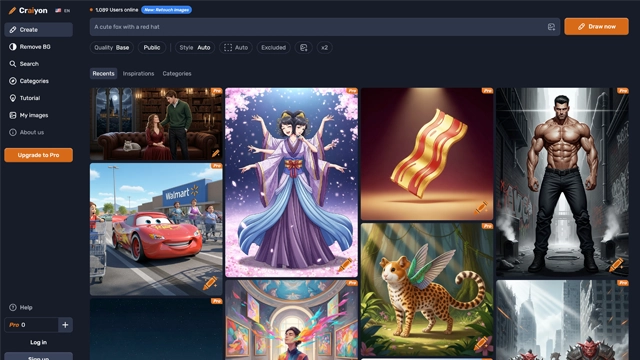
Craiyon AI is one of those tools that makes you pause and smile the first time you use it.
You type a sentence.
You wait a few seconds.
Images appear.
That’s the entire idea.
Craiyon AI is a text to image generator that turns written prompts into visual concepts. It’s not trying to compete with high end design software or premium AI art tools. Instead, it focuses on accessibility and speed.
Think of it like sketching ideas on a digital napkin.
Rough, creative, sometimes weird, often inspiring.
Craiyon started as a simple experiment and grew popular because anyone could use it. No design skills. No setup. Just curiosity and a prompt.
It’s especially appealing to
Craiyon isn’t about perfect images.
It’s about getting ideas out of your head and onto the screen.
Craiyon AI keeps things intentionally simple. That simplicity is the whole point.
Here’s what it actually offers.
Text to Image Generation
You type a prompt and Craiyon generates multiple images based on it. The results can be abstract, literal, funny, or unexpected. That unpredictability is part of the charm.
It’s more about exploration than precision.
No Account Required
You can start generating images without signing up. This lowers the barrier and makes it feel playful instead of technical.
Great for quick experiments.
Multiple Image Variations
Each prompt returns several image options. Even if one result misses the mark, another might spark an idea.
It’s like brainstorming visually.
Style Flexibility
While Craiyon doesn’t offer fine tuned style controls, prompts can guide tone and mood. You can hint at realism, fantasy, art styles, or themes through words alone.
The better the prompt, the better the outcome.
Fast Generation
Images appear quickly, even on the free version. This keeps the creative loop tight and engaging.
You think. You type. You see.
Accessible Interface
No clutter. No learning curve. Just a text box and results. That simplicity makes Craiyon feel friendly rather than intimidating.
Craiyon AI shines when you treat it like a creative companion, not a final production tool.
Here’s where it fits best.
Idea Brainstorming and Inspiration
Writers, designers, and marketers use Craiyon to visualize rough ideas. It helps turn abstract thoughts into something you can react to.
Not perfect. But useful.
Content Creators and Social Media
Quick visuals for posts, memes, or concept testing are easy to generate. Even imperfect images can grab attention or spark engagement.
Storytelling and World Building
Authors and game designers use Craiyon to explore characters, settings, or moods. It’s a fast way to see possibilities without commissioning art.
Learning and Experimentation
If you’re new to AI art, Craiyon is a gentle entry point. You learn how prompts affect outcomes without worrying about credits or complex controls.
Casual Creative Play
Sometimes you just want to explore. Craiyon is great for curiosity driven creativity where the process matters more than the result.
Craiyon keeps pricing straightforward and accessible, just like the tool itself.
Free Plan
You can generate images at no cost. The free version includes
• image generation with ads
• standard generation speed
• watermarked results
It’s enough for experimentation, learning prompts, and casual creativity.
Paid Plans
Craiyon offers paid options for users who want fewer interruptions and better output. These plans typically include
• faster image generation
• no ads
• no watermarks
• higher usage limits
Paid plans are useful if you’re generating images regularly or using them for content creation.
Is Craiyon worth paying for?
If you’re using it occasionally, the free plan is fine.
If you rely on it for ideas, posts, or repeated inspiration, paid plans remove friction and save time.
Pricing and plan details can change, so it’s best to check Craiyon’s official site for the latest options.
Craiyon AI is honest about what it is. That makes judging it easier.
Here’s the clear breakdown.
Pros
Free and accessible
You can start creating images instantly without signing up or paying.
Beginner friendly
No learning curve. Anyone can use it in seconds.
Fast idea generation
Great for brainstorming visuals and exploring concepts.
Encourages creativity
The unexpected results often spark new ideas.
Low commitment
Perfect for casual use or quick experiments.
Cons
Image quality is basic
Results are often rough compared to advanced AI art tools.
Limited control
You can’t fine tune styles, lighting, or composition deeply.
Watermarks on free images
Free outputs aren’t ideal for professional use.
Not for final artwork
Craiyon works better as a sketchpad than a production tool.
Craiyon AI isn’t trying to be the next big art studio. It’s not about polished, gallery-ready visuals or ultra-detailed renderings. What it is, is a playful, open door into creative thinking.
If you’re stuck on a concept, trying to visualize a rough idea, or just want a quick spark for your next project, Craiyon does that reliably and without fuss. It’s like sketching with a wide marker instead of a fine brush you see shape and direction fast, even if details are loose.
For casual creators, social posts, brainstorming sessions, or just discovering what your prompts can do, Craiyon is easy to drop into and hard to lose interest in.
But if your goal is high-fidelity images for commercial use, branding, or professional design, you’ll likely need stronger tools. Craiyon’s strength is in play, exploration, and quick visual feedback not final production assets.
Craiyon AI is perfect as a creative spark and idea generator, not as your final art engine.
Is Craiyon AI free to use?
Yes. Craiyon has a free version that lets you generate images without creating an account. There are paid options if you want fewer ads, faster generation, or higher priority access.
Do I need design skills to use Craiyon?
No. If you can type a sentence, you can use Craiyon. The quality of results depends more on how clearly you describe your idea than on any technical skill.
Can I use Craiyon images for commercial projects?
This depends on the usage rights stated on Craiyon’s website. In general, it’s safer to treat Craiyon images as concept visuals rather than final commercial assets. Always check the latest license terms before using them for business or branding.
Why do some images look strange or inaccurate?
Craiyon focuses on speed and accessibility, not precision. It’s common to see odd proportions, unclear faces, or abstract results. That’s part of the tradeoff for quick idea generation.
Is Craiyon good for professional designers?
As a brainstorming tool, yes. As a final production tool, no. Designers often use Craiyon to explore ideas quickly, then move to more advanced tools for polished output.
How is Craiyon different from tools like Midjourney or DALL·E?
Craiyon is simpler and more open. It doesn’t aim for cinematic realism or complex control. Think of it as a sketchpad, while tools like Midjourney are closer to full art studios.
Can Craiyon generate logos or brand visuals?
It can generate rough visual concepts, but it’s not suitable for finished logos or brand assets. Use it for inspiration, not final identity work.
Smarter search, deeper conversations — meet your intelligent web companion.
AI-powered answers, backed by real-time sources you can trust.
Your smart AI companion that writes, thinks, and chats—just like a human (but faster).

Your one-stop curated AI directory. Explore, compare, and leverage top verified AI tools across dozens of real-world workflows.
© 2026 AI Libry. All rights reserved. Curating the intelligence frontier.