
Edit media like text
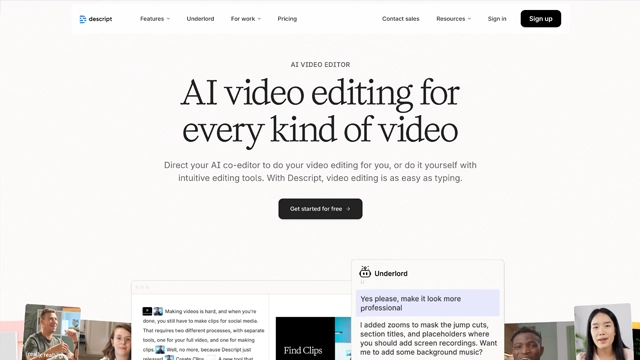
Descript AI changes how editing feels.
Instead of cutting timelines and dragging clips, you edit audio and video by editing text. Delete a word from the transcript and the audio disappears. Fix a sentence and the video updates with it. It feels closer to writing than editing.
At its core, Descript is an AI powered audio and video editing platform built for creators, podcasters, educators, and teams who value speed and clarity over complex tools.
Here’s the mental model that helps
Traditional editors work like scissors.
Descript works like a word processor.
You upload audio or video. Descript transcribes it. From there, the transcript becomes the control panel. You can remove filler words, clean up mistakes, add captions, and even generate voiceovers using AI.
It’s especially popular with people who
Descript doesn’t try to replace professional editing software for cinematic work. What it does instead is remove the friction for everyday content creation.
This is where Descript AI earns its reputation.
The tool isn’t trying to impress with flashy effects. It focuses on removing pain from the editing process.
Text Based Audio and Video Editing
This is the core feature. Edit your media by editing the transcript. Delete a sentence, the clip is gone. Rearrange text, the video follows.
It feels natural, especially if you write more than you edit.
Automatic Transcription
Upload a file and Descript generates a clean, searchable transcript. Accuracy is solid, and corrections are easy when needed.
Once transcribed, everything else becomes faster.
Filler Word Removal
Um, uh, you know. Gone in one click.
This alone saves hours for podcasters and speakers.
Overdub AI Voice
Need to fix a sentence without re recording? Descript lets you generate AI voice replacements using your own voice model.
Used carefully, it’s powerful. Used too much, it can sound artificial.
Screen Recording and Publishing
You can record screens, webcams, and audio directly inside Descript. It’s useful for tutorials, demos, and walkthroughs.
Export options are straightforward and platform friendly.
Collaboration and Version Control
Teams can comment, edit, and track changes without exporting files back and forth. This makes Descript practical for remote teams and content workflows.
Descript AI works best when clarity and speed matter more than cinematic polish.
Here’s where it shines.
Podcast Editing
This is Descript’s home turf. You can clean episodes, remove filler words, fix mistakes, and export polished audio without touching complex timelines.
If you publish regularly, the time savings add up fast.
Talking Head and Educational Videos
Creators who speak directly to camera benefit the most. Editing becomes closer to rewriting a script than cutting footage.
Mistakes stop being expensive.
Content Repurposing
Long interviews can turn into short clips, quotes, or social posts. Descript makes trimming and extracting moments painless.
It’s ideal for creators who want more output from the same recording.
Remote Interviews and Team Content
Recording interviews, syncing tracks, and collaborating on edits happens in one place. No emailing files. No confusion.
Course Creators and Educators
If your content is explanation heavy, Descript keeps production simple while maintaining quality.
Descript uses a tiered pricing model, built around how much you edit and how often you publish.
There’s a free entry point, then paid plans that unlock speed, scale, and advanced AI features.
Free Plan
Good for testing the workflow. You get limited transcription minutes and basic editing tools. Enough to understand how text based editing feels, not enough for regular publishing.
Think of it as a test drive.
Creator and Pro Plans
These plans are designed for podcasters, YouTubers, and educators who publish consistently. They usually include
• more transcription hours
• filler word removal
• Overdub access
• higher export limits
• collaboration features
This is where Descript becomes a daily tool.
Team Plans
Built for businesses and media teams. You get shared workspaces, better version control, and higher usage limits. It’s practical for agencies and internal content teams.
Is Descript worth the price?
If you edit audio or video regularly, Descript often replaces multiple tools. The time saved usually justifies the subscription.
Pricing can change, so it’s best to check Descript’s official website for the most current plans and limits.
Descript AI does a lot of things extremely well. It also has a few limits that matter depending on how you create.
Here’s the balanced view.
Pros
Edit media like writing
Text based editing feels natural and dramatically reduces editing time.
Huge time saver for podcasts
Filler word removal and quick corrections make long edits manageable.
Overdub fixes mistakes fast
Small errors don’t require full re recordings.
All in one workflow
Recording, editing, captions, and exports live in one platform.
Beginner friendly
You don’t need prior editing experience to get clean results.
Cons
Not for cinematic editing
If you need advanced transitions, effects, or color grading, this isn’t the tool.
Overdub needs careful use
AI voice can sound unnatural if overused.
Transcription accuracy varies
Strong accents or noisy audio may need manual cleanup.
Subscription required for serious use
The free plan is limited and easy to outgrow.
Descript AI is one of those tools that changes how you think about editing.
If traditional timelines feel slow or intimidating, Descript removes that friction. Editing becomes closer to rewriting than cutting. Mistakes stop feeling expensive. Publishing feels lighter.
It’s not built for filmmakers or cinematic storytelling. That’s not the goal.
It’s built for people who talk for a living.
Podcasters, educators, YouTubers, and teams who value speed will get the most from it. If your content relies on clarity, conversation, and consistency, Descript fits naturally into your workflow.
It won’t replace every editing tool. But once you use it, it’s hard to go back.
Is Descript AI free?
Yes. Descript offers a free plan with limited transcription minutes and basic editing features. It’s useful for testing how text based editing works, but regular creators usually need a paid plan.
How does Descript AI work?
You upload or record audio or video. Descript transcribes it automatically. From there, you edit the transcript like a document, and the audio or video updates instantly.
Is Descript good for podcast editing?
Very much. Descript is one of the most popular tools for podcast editing because of filler word removal, fast edits, and clean exports.
Can Descript replace traditional video editors?
For talking head videos, podcasts, tutorials, and interviews, yes. For cinematic edits, advanced effects, or complex animations, no. It’s built for speed, not visual heavy production.
Is Descript Overdub safe to use?
Yes. Overdub requires explicit voice training and consent. It’s designed for ethical voice use and small corrections, not impersonation.
Does Descript support team collaboration?
Yes. Paid plans allow shared projects, comments, and version control, which makes it practical for remote teams.

Your one-stop curated AI directory. Explore, compare, and leverage top verified AI tools across dozens of real-world workflows.
© 2026 AI Libry. All rights reserved. Curating the intelligence frontier.