
Chat with your data
Here’s the thing. Most people don’t struggle with data because it’s complex. They struggle because tools make it feel unapproachable.
Julius AI flips that dynamic.
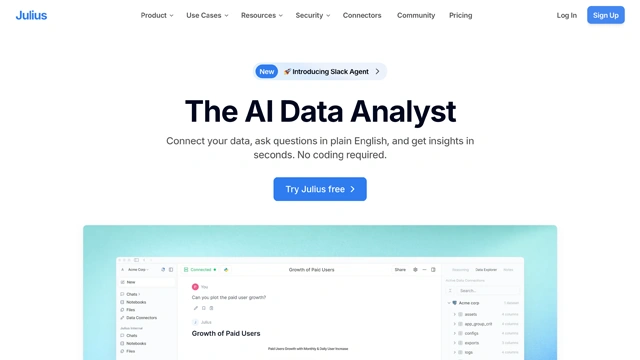
At its core, Julius AI is a data analysis assistant that lets you talk to your data like you’d talk to a smart colleague. You upload spreadsheets, datasets, or documents. Then you ask questions in plain language. Julius handles the charts, calculations, and explanations for you.
No formulas. No syntax anxiety. No switching between tools.
Think of it like sitting next to a data analyst who never gets tired and never asks you to “clean the data first.” You ask what you want to know. It figures out how to get there.
It’s especially useful for people who work with data regularly but don’t want to live inside Excel formulas or Python notebooks. Students, analysts, founders, marketers, and researchers tend to feel at home here fast.
Julius AI is built around one simple idea. Make data feel conversational, not intimidating.
Instead of burying you in buttons and menus, it focuses on what you actually want. Answers, visuals, and clarity.
Natural language data analysis
You can ask questions the way you naturally think.
“Which month had the highest revenue?”
“Compare conversion rates by channel.”
“Show me trends over the last year.”
Julius translates those questions into analysis behind the scenes.
Automatic charts and visuals
When numbers need visuals, Julius creates them for you. Bar charts, line graphs, tables, and summaries appear exactly when they’re useful. It’s like the tool knows when a picture explains better than text.
Spreadsheet and dataset support
Upload CSVs, Excel files, Google Sheets exports, and more. Julius works directly with real-world data, not just clean demo files.
Step by step explanations
What this really means is you’re not just getting answers. You’re learning as you go. Julius explains how it reached conclusions, which makes it easier to trust and reuse insights.
Fast iteration
Ask a follow-up question. Then another. And another. Julius remembers context, so analysis feels like a flowing conversation instead of disconnected queries.
Export ready results
Charts, summaries, and tables can be shared or reused in reports, presentations, or docs without rebuilding anything manually.
Julius doesn’t try to replace advanced data science platforms. It removes friction between curiosity and understanding.
Julius AI shines when people want insight, not spreadsheets gymnastics. Here’s where it fits naturally.
Students and researchers
Instead of wrestling with formulas, students can focus on learning patterns, testing hypotheses, and understanding outcomes. Upload data. Ask questions. Learn faster.
Business and startup teams
Founders and operators use Julius to review metrics, spot trends, and validate decisions without waiting on analysts. It’s perfect for quick internal insights.
Marketing and growth teams
Campaign performance, channel comparisons, and funnel analysis become conversational. You ask what worked. Julius shows you why.
Analysts and consultants
Even experienced analysts use it for exploration and first-pass analysis. It speeds up early insights before deeper modeling begins.
Finance and operations
Budget reviews, expense breakdowns, forecasting trends, and performance tracking all become simpler when questions drive analysis.
Curious professionals
If you regularly work with numbers but don’t enjoy spreadsheets, Julius feels like a relief. It turns data into something approachable.
In short, Julius AI works best when clarity matters more than complexity.
Julius AI keeps pricing simple, which fits its overall philosophy.
There’s a free plan that lets you explore the core experience. You can upload datasets, ask questions, and generate basic charts. It’s enough to understand how the tool thinks and whether it fits your workflow.
For heavier use, there’s a paid plan. This unlocks higher data limits, faster responses, and more advanced analysis sessions. It’s designed for people who work with data regularly and don’t want interruptions.
Pricing can change as the product evolves, so the safest move is to check the official Julius AI site for the latest details.
What matters more than the numbers is the value tradeoff. If Julius saves you hours of manual analysis or back-and-forth with spreadsheets, the upgrade usually pays for itself quickly.
No tool is perfect. Julius AI has clear strengths, and a few limits worth knowing upfront.
Pros
Cons
Julius doesn’t try to replace Excel, Python, or enterprise BI platforms. It sits comfortably between curiosity and clarity.
Julius AI is one of those tools that quietly changes how you work with data.
It doesn’t ask you to become more technical. It meets you where you already are. If you can ask a question, you can analyze data.
For students, founders, marketers, and professionals who want insights without friction, Julius feels refreshingly human. It turns data analysis into a conversation instead of a chore.
If you need deep statistical modeling or enterprise dashboards, you’ll still want specialized tools. But for everyday exploration, understanding trends, and answering real questions quickly, Julius AI delivers real value.
Simple questions. Clear answers. Less effort.
Is Julius AI free to use?
Yes. Julius AI offers a free plan that lets you upload data and run basic analysis. Paid plans unlock higher limits and faster workflows.
What file types does Julius AI support?
Julius works with common formats like CSV and Excel files. These cover most real-world datasets used by students and professionals.
Do I need data science skills to use Julius AI?
No. That’s the point. You ask questions in plain English and Julius handles the analysis behind the scenes.
Can Julius AI create charts automatically?
Yes. Charts and tables are generated automatically when they help explain results better than text.
Is Julius AI accurate?
For exploratory analysis and trend discovery, it’s reliable. Like any AI tool, results improve when data is clean and questions are clear.
Is Julius AI suitable for teams?
It works well for individuals and small teams. Larger organizations may still pair it with traditional BI tools.
Smarter search, deeper conversations — meet your intelligent web companion.
Your imagination. Leonardo’s canvas.
The AI that thinks with you—not just for you.

Your one-stop curated AI directory. Explore, compare, and leverage top verified AI tools across dozens of real-world workflows.
© 2026 AI Libry. All rights reserved. Curating the intelligence frontier.