
Turn documents into spreadsheets
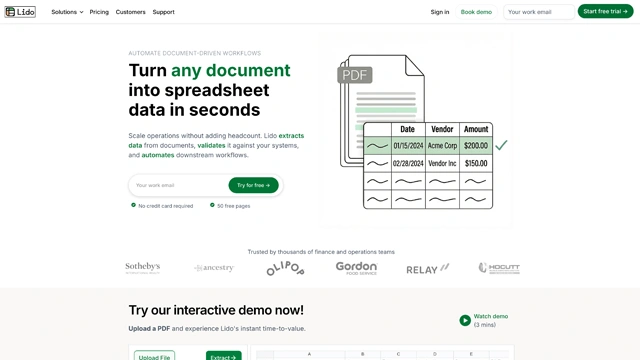
If you’ve ever stared at a PDF full of tables and thought, there has to be a better way, Lido AI was built for that exact moment.
Lido AI is an AI-powered OCR and document extraction tool that converts PDFs and financial documents into clean, editable Excel spreadsheets. No copy-paste gymnastics. No broken rows. No manual cleanup that eats your afternoon.
Here’s what makes it different. Lido doesn’t just read text. It understands tables, numbers, and structure. That’s critical when you’re dealing with invoices, bank statements, balance sheets, or reports where accuracy actually matters.
Think of it like a translator. PDFs speak chaos. Excel speaks structure. Lido sits in between and makes sure nothing gets lost in translation.
It’s especially useful for finance teams, accountants, analysts, operations teams, and anyone who regularly turns static documents into working data.
Lido AI focuses on doing one thing really well. Turning messy documents into structured spreadsheets you can actually work with.
Here’s how it pulls that off.
AI powered OCR for tables
Lido goes beyond basic text recognition. It understands rows, columns, totals, and headers. That’s the difference between a usable spreadsheet and a broken one.
PDF to Excel conversion
Upload PDFs and get Excel files that preserve layout and numerical accuracy. This matters when formulas, audits, or financial reviews are involved.
Financial document awareness
Lido is tuned for finance heavy documents. Bank statements, invoices, reports, and ledgers are handled with far more care than generic OCR tools.
Clean data output
What this really means is less cleanup. Columns align properly. Numbers stay where they belong. Formatting makes sense from the start.
Fast processing
Documents are processed quickly, even when files are long or table dense. You don’t wait around wondering if the tool froze.
Spreadsheet ready results
Outputs are ready for analysis, formulas, and reporting. You can plug the data straight into your workflow instead of fixing errors first.
Lido doesn’t try to be a document editor or workflow platform. It stays focused on accuracy and structure. That’s why it works.
Lido AI earns its place when documents stop being readable and start needing structure.
Accounting and finance teams
Monthly statements, invoices, and reports move from PDF to Excel without manual entry. That saves hours and reduces human error.
Financial analysts
Historical data locked inside PDFs becomes analyzable in minutes. Trend analysis and forecasting become easier when data isn’t trapped.
Operations and admin teams
Vendor reports, internal documents, and recurring PDFs turn into usable spreadsheets without repetitive work.
Audits and compliance
Accuracy matters here. Lido preserves numerical structure so audits don’t start with data cleanup.
Small businesses and startups
Teams without dedicated data staff can still work efficiently with financial documents.
Consultants and agencies
Client documents arrive in every format imaginable. Lido normalizes them quickly so real work can begin.
If your workflow includes phrases like export to Excel or recreate this table, Lido fits naturally.
Lido AI follows a usage-based approach, which makes sense for the kind of work it handles.
There’s typically a free tier or trial that lets you test how well the OCR handles your documents. This is useful for validating accuracy before committing.
Paid plans scale based on factors like:
For individuals or small teams with occasional PDF-to-Excel needs, entry-level plans are usually enough. For finance teams or businesses processing documents daily, higher tiers offer better value and fewer limits.
Pricing can evolve as features expand, so the safest option is to check the official Lido AI website for current plans and limits.
What matters most is time saved. If Lido replaces hours of manual data entry, it quickly pays for itself.
Lido AI uses clear, volume-based pricing, which fits well with how finance and operations teams actually work.
Here’s the current structure.
Starter – $24 per month
Best for individuals and small teams.
Includes up to 100 pages per month, making it ideal for light but regular PDF-to-Excel work.
Professional – $95 per month
Built for small finance teams.
Handles up to 500 pages per month, suitable for recurring reports, invoices, and statements.
Business – $150 per month
Designed for growing businesses with heavier document flow.
Supports up to 1,000 pages per month, reducing bottlenecks as volume increases.
Enterprise – Custom pricing
For large teams with advanced needs.
Custom page limits, integrations, and tailored workflows are available.
Disclaimer: Pricing and limits may change over time. For the most accurate and up-to-date details, always refer to the official Lido website.
What this really means is you pay based on how much work you actually do. If document volume drives your workflow, Lido’s pricing stays predictable and easy to justify.
Lido AI is very focused, and that focus shows in both its strengths and its limits.
Pros
Cons
Lido doesn’t try to do everything. It does one thing well. Turning static financial documents into clean, usable spreadsheets.
Lido AI is built for a very real, very common problem. Important data locked inside PDFs.
If your work involves financial documents, reports, or statements that constantly need to end up in Excel, Lido removes the most frustrating part of that process. It’s accurate, focused, and refreshingly straightforward.
This isn’t a general-purpose OCR tool. It’s a specialist. And for accountants, analysts, finance teams, and operations professionals, that specialization is exactly the point.
If structured data extraction is slowing you down, Lido AI is a practical investment that pays off in time saved and fewer errors.
What types of documents does Lido AI support?
Lido AI works best with PDFs that contain tables and structured financial data. Invoices, bank statements, balance sheets, and reports are ideal.
How accurate is Lido AI for financial documents?
Accuracy is high for structured tables. Results improve further when documents are clean and clearly formatted.
Does Lido AI require manual template setup?
No. Lido uses AI-driven extraction, so most documents work without manual configuration.
Can Lido AI export directly to Excel?
Yes. Excel is the primary output format, making it easy to plug extracted data into existing workflows.
Is Lido AI suitable for teams?
Yes. Professional, Business, and Enterprise plans are designed for team use and higher document volumes.
Is Lido AI secure?
Lido follows standard data handling and security practices. For sensitive financial data, enterprise options offer additional controls.
AI-powered answers, backed by real-time sources you can trust.
Design smarter, not harder—with Figma AI and Vibe as your creative copilots.
Your imagination. Leonardo’s canvas.

Your one-stop curated AI directory. Explore, compare, and leverage top verified AI tools across dozens of real-world workflows.
© 2026 AI Libry. All rights reserved. Curating the intelligence frontier.