
Turn messy emails into data
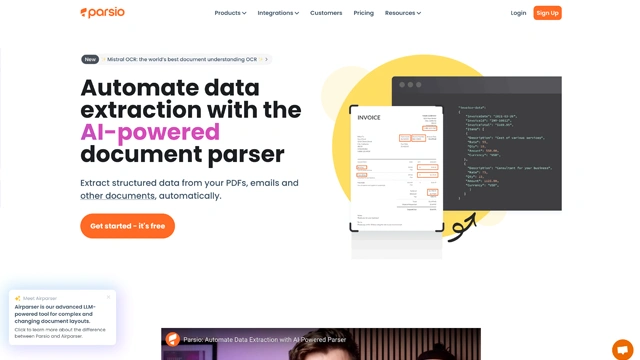
If you’ve ever copied data from emails into spreadsheets and thought “there has to be a better way,” this is where Parsio quietly steps in.
Parsio is an AI-powered data extraction tool that turns unstructured content into clean, usable data. Think emails, PDFs, invoices, receipts, or system notifications. Instead of reading and copying line by line, Parsio reads them for you and sends the extracted information straight into tools you already use.
The simplest way to imagine it is this.
Your inbox is a pile of handwritten notes. Parsio acts like a fast, accurate assistant who rewrites everything into neat tables without complaining.
You forward emails or upload documents, define what data matters, and Parsio automatically pulls fields like names, dates, order numbers, prices, or tracking IDs. No manual work. No missed details.
It’s especially popular with teams dealing with repetitive data flows. Sales leads, support tickets, bookings, shipping alerts, financial documents. Anywhere structured data hides inside messy text, Parsio brings order.
What this really means is less time doing copy-paste work and more time using the data to actually move things forward.
Parsio doesn’t try to impress you with flashy dashboards. Its strength is quieter and more practical. It focuses on doing one job very well: extracting data accurately and sending it where it needs to go.
Here’s what stands out.
Smart Email Parsing
Parsio connects to your inbox or works via email forwarding. Once emails arrive, it automatically scans the content and pulls out the fields you care about. Names, phone numbers, order IDs, dates, prices. You decide the structure once, and it repeats the task consistently.
Think of it like teaching someone how to read a specific type of email. After that, they never forget.
Document and PDF Extraction
Beyond emails, Parsio handles PDFs, attachments, and documents. Invoices, receipts, reports, shipping confirmations. Even when layouts vary slightly, it stays reliable once trained.
This is especially helpful when documents look human-readable but are painful for spreadsheets.
No-Code Parsing Templates
You don’t need to write rules or scripts. Parsio offers visual tools to create parsing templates. Highlight what you want, label it, and save the pattern. That’s it.
It feels more like pointing and teaching than configuring software.
Automatic Data Export
Extracted data doesn’t just sit there. Parsio pushes it to Google Sheets, Excel, Zapier, Make, CRMs, databases, or internal systems. Data flows in real time, not at the end of the day.
This turns Parsio into a bridge between incoming messages and your workflows.
Multi-Language Support
If your emails or documents come in different languages, Parsio can still parse them. This matters a lot for global teams handling international vendors or customers.
Team Collaboration
You can manage access, share mailboxes, and control who edits templates or exports data. It’s built for teams, not just solo users automating one inbox.
Parsio fits best in places where information keeps arriving, looks repetitive, and somehow still needs manual handling. If your team reads the same kind of email every day and copies data into tools, this is where Parsio quietly shines.
Here’s how people actually use it.
Sales Lead Capture
Contact forms, inquiry emails, demo requests. Parsio extracts names, emails, phone numbers, company details, and pushes them straight into a CRM or Google Sheet. No more missed leads sitting in inboxes.
It’s like having an assistant who never forgets to log a lead.
Order and Booking Processing
Ecommerce orders, travel bookings, appointment confirmations. Parsio pulls order IDs, dates, prices, and customer info from emails or PDFs and sends them to internal systems automatically.
This keeps operations moving without constant inbox monitoring.
Invoice and Receipt Handling
Finance teams use Parsio to extract invoice numbers, totals, tax amounts, and due dates from PDFs and emailed bills. Data lands directly in spreadsheets or accounting tools.
Less typing. Fewer errors. Faster month-end closing.
Support Ticket Routing
Support emails often follow patterns. Parsio extracts key fields like issue type, customer ID, priority, and routes the data into ticketing systems.
It shortens response time without forcing customers to use rigid forms.
Logistics and Shipping Updates
Shipping confirmations, tracking emails, delivery notes. Parsio captures tracking numbers and delivery dates and updates logistics dashboards in real time.
No one needs to chase updates across emails anymore.
Internal Reporting
Some teams use Parsio to monitor system alerts, reports, or automated emails and convert them into structured datasets. This is useful for audits, monitoring, and compliance reporting.
Parsio keeps pricing practical. You’re paying for extraction volume, not vague AI promises. That makes it easier to predict costs as your usage grows.
Here’s how it usually breaks down.
Free Plan
Good for testing and light use.
You get a limited number of document or email parses per month with basic features.
This works if you just want to see how accurate the extraction is before committing.
Starter Plans
Designed for freelancers and small teams.
Includes higher monthly document limits, multiple parsers, and integrations like Google Sheets, Zapier, or webhooks.
This is where Parsio starts saving real time.
Business Plans
Built for teams handling large email volumes or PDFs daily.
You get higher limits, priority processing, advanced parsing options, and more integrations.
Most growing operations land here.
Enterprise
Custom pricing for high-volume or complex workflows.
This usually includes dedicated support, SLA options, and tailored integrations.
No tool is perfect. Parsio is strong in the right places and intentionally narrow in others. That’s actually part of its appeal.
Pros
Saves hours on manual work
If you deal with emails, invoices, or PDFs daily, Parsio feels like hiring a quiet assistant who never gets tired.
Reliable data extraction
Once a parser is set up, the results are consistent. No guessing. No rework.
Works with real workflows
Native integrations and webhooks make it easy to push data into CRMs, spreadsheets, or internal systems.
No heavy learning curve
You don’t need AI expertise. The interface stays focused on getting data out, fast.
Scales cleanly
You can start small and grow without rebuilding everything from scratch.
Cons
Not a general AI tool
Parsio doesn’t write content, summarize text, or chat. It does one job and sticks to it.
Setup takes some thinking
Initial parser setup may take a bit of trial and error, especially for complex documents.
Limited creativity
If your data formats change wildly every time, some adjustments will be needed.
Parsio isn’t trying to impress you with flashy AI tricks. And that’s exactly why it works.
If your day includes invoices in emails, PDFs from vendors, forms from customers, or reports landing in shared inboxes, Parsio quietly removes the boring part. Think of it like a filter that turns noise into structure.
It’s not for brainstorming or creative work. It’s for people who value clean data, predictable outputs, and fewer manual mistakes.
For operations teams, finance teams, real estate businesses, logistics companies, and anyone drowning in repetitive document handling, Parsio feels less like a tool and more like relief.
If structured data extraction is a real pain point, Parsio is worth serious consideration.
Is Parsio easy to use without coding?
Yes. Parsio is built for non-technical users. You define parsing rules visually, and the platform handles the extraction. No scripts or complex setup needed.
What types of documents does Parsio support?
Parsio works with emails, PDFs, Word files, HTML pages, and attachments. It also handles scanned documents when OCR is required.
Can Parsio integrate with other tools?
Yes. Parsio connects with tools like Google Sheets, Zapier, Make, Slack, CRMs, and databases. Extracted data can move automatically into your existing workflows.
Is Parsio accurate for invoice and receipt parsing?
For structured and semi-structured documents, accuracy is high. Once templates are set correctly, results stay consistent across large volumes.
Does Parsio use AI or rules-based parsing?
Parsio combines both. It uses intelligent parsing with rule-based control, which keeps results predictable rather than random.
Is Parsio suitable for large teams?
Yes. It supports team collaboration, shared inboxes, and scalable processing, making it practical for growing operations.
AI-powered answers, backed by real-time sources you can trust.
The chatbot that dares to have a personality.
Open-source intelligence designed for devs, dreamers, and doers.

Your one-stop curated AI directory. Explore, compare, and leverage top verified AI tools across dozens of real-world workflows.
© 2026 AI Libry. All rights reserved. Curating the intelligence frontier.