
Big data, spreadsheet simple
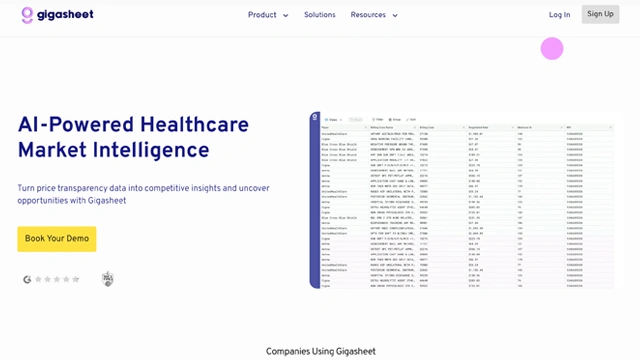
If spreadsheets had a breaking point, most of us have hit it already.
Files too large to open. Rows that freeze your system. Data that technically exists but feels unusable. Gigasheet AI was created to remove that wall.
Gigasheet AI is a no-code big data analysis platform that lets you work with massive datasets using a familiar spreadsheet interface. No databases to configure. No scripts to write. No waiting for engineering help.
You upload large files like CSVs, logs, or datasets that would normally crash Excel or Google Sheets. Gigasheet handles the heavy lifting in the background, while you interact with the data the same way you always have. Filter, sort, search, analyze.
Think of it as a spreadsheet that grew up and learned how to handle real-world data volumes.
It’s built for analysts, marketers, operations teams, security teams, and anyone who needs answers from large datasets without becoming a data engineer.
Gigasheet AI focuses on one promise. Make big data feel as easy as a spreadsheet.
Here’s how it delivers on that.
Handles massive datasets
Gigasheet works with files containing millions or even billions of rows. Data that would crash traditional spreadsheets opens smoothly and stays responsive.
Spreadsheet-style interface
No new mental models to learn. Filters, sorting, searching, and column operations feel familiar, which lowers the barrier instantly.
No-code data exploration
You don’t need SQL, Python, or BI tools. Click, filter, group, and explore data visually without writing a single line of code.
Fast querying and filtering
What this really means is speed. You can slice large datasets in seconds, not minutes, even when working with complex filters.
Data enrichment and transformations
Clean, transform, and enrich datasets directly inside the platform. Fix formats, normalize values, and prep data for analysis or export.
Secure cloud-based processing
All heavy processing happens in the cloud, so your local machine stays fast. This also makes collaboration easier across teams.
Export and sharing
Once insights are ready, export filtered datasets or share views with teammates without duplicating files.
Gigasheet doesn’t replace spreadsheets. It extends them to handle reality-sized data.
Gigasheet AI fits wherever data outgrows traditional tools but still needs quick answers.
Marketing and growth teams
Analyze large campaign datasets, attribution logs, and performance exports without sampling or shortcuts.
Security and IT teams
Work with massive log files, event data, and system exports without building custom pipelines.
Operations and analytics
Track operational metrics across large datasets without relying on engineering teams.
Product and data analysts
Explore raw data early, validate hypotheses, and identify trends before moving into deeper modeling.
Finance and reporting
Handle large transactional datasets, clean records, and prepare reports without crashing spreadsheets.
Agencies and consultants
Client data arrives in all shapes and sizes. Gigasheet makes exploration fast, even under tight deadlines.
If your work starts with “the file is too big to open,” Gigasheet belongs in your toolkit.
Gigasheet AI follows a tiered pricing model based on data volume and usage, which makes sense for a platform built around large files.
There’s usually a free or trial option that lets you explore the interface and test smaller datasets. It’s enough to understand how the platform works and whether it fits your workflow.
Paid plans scale with things like:
For individuals and small teams working with moderately large files, entry plans are often sufficient. Teams dealing with massive logs or frequent analysis typically move to higher tiers for performance and flexibility.
Pricing evolves as features expand, so for exact limits and current plans, it’s best to check the official Gigasheet website.
The real value shows up when you stop worrying about file size and start focusing on insights instead.
Gigasheet keeps pricing straightforward and flexible, especially for teams testing big data workflows.
Free Tier
You can start at no cost to explore core functionality. This is useful for validating the interface, testing smaller datasets, and understanding how Gigasheet handles large files.
Enterprise Solutions
For larger teams or complex needs, custom pricing is available. These plans are tailored around data volume, performance requirements, security controls, and collaboration features.
Disclaimer: Pricing details can change. For the most accurate and current information, always refer to the official Gigasheet website.
What this really means is low risk to start and room to scale when data demands grow.
Gigasheet AI is purpose-built for a specific problem. Working with data that’s too big for spreadsheets. That focus shows clearly in what it does well and where it draws the line.
Pros
Cons
Gigasheet shines when scale is the problem. If file size is what’s blocking progress, this tool removes that barrier cleanly.
Gigasheet AI solves a very specific frustration, and it solves it well.
When data grows beyond what Excel or Google Sheets can handle, most teams hit a wall. Gigasheet removes that wall without forcing you to learn new tools, query languages, or workflows.
It’s not trying to be a flashy analytics platform. It’s a practical bridge between everyday spreadsheet users and big data reality. For analysts, marketers, operations teams, security teams, and anyone dealing with massive files, that simplicity is the real win.
If your biggest problem with data is size, not skill, Gigasheet AI is a smart, low-friction solution.
Is Gigasheet AI free to use?
Yes. Gigasheet offers a free tier that allows you to explore its core features and test smaller datasets without cost.
Can I handle extremely large datasets with Gigasheet?
Yes. Gigasheet is specifically built for massive files that traditional spreadsheets cannot handle, maintaining speed and responsiveness.
Do I need coding skills to use Gigasheet?
No. The platform is completely no-code. You interact with data using familiar spreadsheet-like operations.
Can Gigasheet export data to other formats?
Yes. Processed data can be exported for use in Excel, CSV, or other workflows.
Is Gigasheet suitable for teams?
Yes. Enterprise solutions support team collaboration, shared datasets, and customized workflows for larger organizations.
Does Gigasheet provide cloud-based processing?
Yes. All heavy processing occurs in the cloud, keeping local systems fast and enabling large-scale analysis.
How do I scale as my data grows?
Start with the free tier for testing. As dataset size and team needs increase, enterprise plans can be customized to handle larger volumes and advanced features.
The chatbot that dares to have a personality.
Your smart AI companion that writes, thinks, and chats—just like a human (but faster).
A multimodal genius designed to think, see, and build with you.

Your one-stop curated AI directory. Explore, compare, and leverage top verified AI tools across dozens of real-world workflows.
© 2026 AI Libry. All rights reserved. Curating the intelligence frontier.