
Smarter slides, clearer storytelling
Verified
AI Categories: Presentation, Education, Image Generators,
Pricing Model: Free Trial
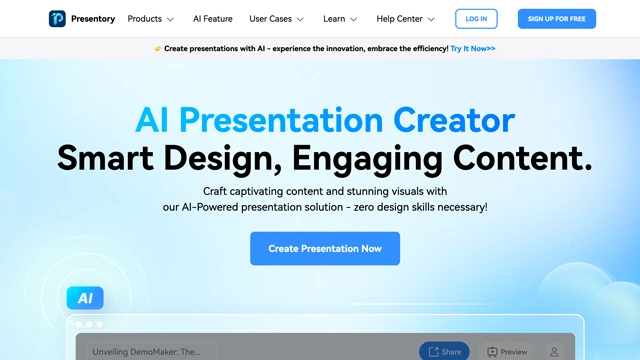
We’ve all been there. You have an idea worth sharing, but turning it into a polished presentation feels harder than the idea itself.
Wondershare Presentory is an AI-powered presentation tool designed to help you create, structure, and present ideas more confidently. It doesn’t just help you design slides. It helps you think through what to say, how to say it, and how to keep your audience engaged.
At its core, Presentory combines AI scripting, visual support, and presentation guidance into one workflow. You give it a topic or outline, and it helps generate structured content, speaker notes, and visuals that actually support your message.
Think of it like a presentation coach sitting next to you. It doesn’t steal the spotlight. It helps you tell your story better.
It’s built for professionals, educators, creators, and teams who want presentations that feel clear, human, and purposeful rather than rushed or cluttered.
Wondershare Presentory focuses on helping you communicate clearly, not just decorate slides.
Here’s what it brings to the table.
AI-generated presentation scripts
Presentory helps turn raw ideas into structured talking points and speaker notes. This is especially useful if you know what you want to say but struggle with flow.
Slide content assistance
Instead of starting from a blank slide, the tool suggests headings, bullet points, and layouts that support your message.
Smart visuals and layout guidance
Presentory helps match visuals to content so slides stay clean and readable. Less clutter. More focus.
Built-in presentation flow
What this really means is better pacing. The tool helps keep your presentation moving logically from one point to the next.
Customization and editing
You stay in control. AI suggestions are editable, so the final voice always feels like yours.
Works across common presentation formats
Presentory integrates smoothly with standard presentation workflows, making it easy to export and share.
It doesn’t try to replace your creativity. It helps remove the friction that usually slows presentation building down.
Wondershare Presentory works best when clarity and confidence matter more than flashy effects.
Business presentations
Pitch decks, internal updates, and strategy presentations benefit from clear structure and focused messaging.
Educators and trainers
Lesson plans and training sessions become easier to organize and deliver when scripts and visuals work together.
Content creators and speakers
Webinars, workshops, and recorded talks feel more natural when the flow is planned in advance.
Sales and marketing teams
Presentory helps teams explain value clearly without overcrowding slides or losing the audience.
Students and academic projects
Turning research into understandable presentations becomes less stressful and more organized.
Remote and virtual presentations
Clear scripts and visuals matter even more on screen. Presentory helps keep attention when distractions are high.
If your biggest challenge is turning ideas into clear communication, Presentory fits naturally.
Wondershare Presentory offers a simple way to try before committing.
Free tier
You can explore Wondershare Presentory with a 7 day free trial. This gives enough time to test features, build a presentation, and see if it fits your workflow.
Pricing note
Pricing plans can change. For the most accurate and current details, always check the official Wondershare Presentory website before making a decision.
Here’s a clear look at where Wondershare Presentory shines and where it may feel limited.
Pros
Cons
Wondershare Presentory is a practical tool for people who want to create clear, professional presentations without getting lost in design work. It focuses on speed, structure, and simplicity rather than flashy effects. That makes it a good fit for everyday business needs, training sessions, and quick idea pitches.
If your goal is to turn rough thoughts into organized slides with minimal effort, this tool delivers. It is not trying to replace advanced design software, and that is actually its strength. You spend less time adjusting layouts and more time refining your message.
For teams, educators, and solo professionals who value clarity over complexity, Wondershare Presentory is worth trying. The free trial gives enough room to decide if it fits your workflow.
Is Wondershare Presentory suitable for beginners?
Yes. It is designed for people who may not have design experience. The interface is simple, and most features are easy to understand without a learning curve.
Can it be used for business presentations?
Absolutely. It works well for sales decks, internal meetings, reports, and client presentations where clarity and structure matter more than heavy animations.
Does it support collaboration?
Basic collaboration depends on the plan and workflow. You can share presentations easily, but advanced team features are more aligned with business use cases.
Is it useful for educators and trainers?
Yes. Educators use it for lesson presentations, training materials, and explainer-style slides where storytelling and flow are important.
Can I export presentations to common formats?
Presentations can be exported in widely used formats, making it easy to present or share across platforms.
Is the free trial enough to evaluate the tool?
The 7-day free trial is enough to explore core features and decide if it fits your presentation style and daily needs.
Featured AI Tools
Figma AI
Freemium, $15/mo
Design smarter, not harder—with Figma AI and Vibe as your creative copilots.

Your one-stop curated AI directory. Explore, compare, and leverage top verified AI tools across dozens of real-world workflows.
© 2026 AI Libry. All rights reserved. Curating the intelligence frontier.


 Visit Site