
Break language barriers instantly
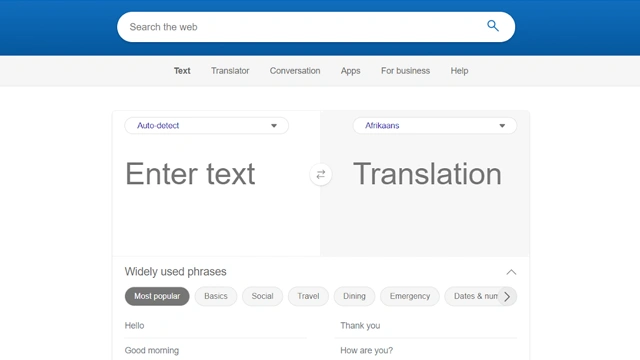
Language shouldn’t be the reason a conversation stops. That’s the simple idea behind Microsoft Translator AI.
Microsoft Translator AI is a real-time translation service built to convert text, speech, images, and conversations across dozens of languages. It’s designed to work quietly in the background while people focus on what actually matters. Understanding each other.
You’ll find it inside Microsoft products like Teams, Office, Edge, and Azure. It also works as a standalone app and API for developers. That flexibility is what gives it reach, from casual travel use to enterprise-scale communication.
Think of it like a universal interpreter that never interrupts. It listens, translates, and stays out of the way.
For individuals, it’s a practical everyday helper. For businesses, it becomes infrastructure. Something that just works when global communication is non-negotiable.
Microsoft Translator AI focuses on reliability and reach. It’s built to work everywhere people communicate, not just inside a single app.
Text translation
Translate text across dozens of languages with strong accuracy and contextual understanding. It works well for short phrases and longer content.
Speech to speech translation
Real-time voice translation allows conversations across languages. Useful for meetings, presentations, and live discussions.
Image translation
Snap a photo of text on signs, menus, or documents and get instant translations. It’s surprisingly practical in real-world scenarios.
Conversation mode
Multiple people speaking different languages can join the same translated conversation. Each participant sees and hears translations in their preferred language.
Integration across Microsoft ecosystem
What this really means is convenience. Translator works inside Teams, Office apps, Edge, and Azure services without extra setup.
Offline language support
Some languages are available offline, which helps in travel or low-connectivity environments.
Developer APIs
For developers, Microsoft Translator offers APIs to build translation directly into apps, websites, and workflows.
Microsoft Translator AI isn’t flashy. It’s dependable. And that’s why it’s widely used.
Microsoft Translator AI fits naturally wherever language slows things down.
Global teams and remote work
Live translation in meetings helps international teams collaborate without friction. No one gets left out of the conversation.
Travel and everyday communication
Menus, signs, directions, and quick conversations become manageable, even in unfamiliar countries.
Education and learning
Students and educators use it to access content in different languages and support multilingual classrooms.
Customer support and service
Support teams can assist users across regions without maintaining separate language teams.
Content localization
Web pages, documents, and internal resources can be translated quickly for global audiences.
Developers and SaaS products
Translation APIs allow apps to scale internationally without building language support from scratch.
If communication crosses borders, Microsoft Translator AI fits into the flow without asking for attention.
Microsoft Translator AI keeps pricing flexible, depending on how and where you use it.
Free tier
You can use Microsoft Translator at no cost for everyday translation needs. This includes basic text, speech, and image translation through Microsoft apps and public tools. For most individuals, this is more than enough.
Advanced and business plans
For organizations and developers, pricing shifts to usage-based and custom plans. Costs depend on factors like API usage, translation volume, and integration requirements within enterprise systems.
This setup works well because casual users aren’t forced into paid plans, while businesses can scale responsibly as usage grows.
Disclaimer: Pricing details may change over time. For the most accurate and current information, always refer to the official Microsoft Translator website.
Microsoft Translator AI is built for reliability at scale. That brings clear strengths and a few trade-offs.
Pros
Cons
Microsoft Translator doesn’t try to impress with personality. It focuses on clarity, speed, and reach.
Microsoft Translator AI does exactly what it promises. It removes language as a blocker.
It’s not built to show off. It’s built to show up. In meetings, in documents, in apps, and in everyday conversations where understanding matters more than polish.
For individuals, the free tier is genuinely useful. For teams and businesses already living inside the Microsoft ecosystem, it feels like a natural extension rather than another tool to manage.
If you need expressive, creative translation, you might look elsewhere. But if your priority is clear, reliable communication across languages, Microsoft Translator AI is a solid, trustworthy choice.
Is Microsoft Translator AI free to use?
Yes. Microsoft Translator offers a free tier that covers basic text, speech, and image translation for everyday use.
How many languages does Microsoft Translator support?
It supports dozens of languages across text and speech, with the list expanding regularly.
Is Microsoft Translator accurate?
For general communication, business use, and real-time conversations, accuracy is strong. As with all translators, results improve with clear input.
Can Microsoft Translator work offline?
Yes. Some language packs are available offline, which is helpful during travel or in low-connectivity areas.
Does Microsoft Translator integrate with Microsoft Teams and Office?
Yes. It works directly inside Microsoft Teams, Office apps, Edge, and other Microsoft services.
Is Microsoft Translator suitable for businesses?
Yes. With APIs and usage-based pricing, it scales well for enterprise and developer use cases.
Open-source intelligence designed for devs, dreamers, and doers.
Smarter search, deeper conversations — meet your intelligent web companion.
The chatbot that dares to have a personality.

Your one-stop curated AI directory. Explore, compare, and leverage top verified AI tools across dozens of real-world workflows.
© 2026 AI Libry. All rights reserved. Curating the intelligence frontier.